
Why Your Website Doesn’t Work in China, and How to Fix It
Updated on |By QPSoftware
A website usually stops working in China for one of three reasons. It loads resources that are blocked or slowed there, such as Google Fonts, Google Maps or reCAPTCHA. It is hosted far away, or on a shared IP address that was blocked. Or its content is restricted in China. Removing blocked resources and hosting closer fixes most cases.
Key takeaways
- The Great Firewall blocks or slows many foreign services, and a single blocked script can stall a whole page.
- Google’s own reCAPTCHA documentation tells developers to use www.recaptcha.net where www.google.com is not accessible.
- Hosting in mainland China is the fastest option but needs an ICP filing; hosting in Hong Kong needs none and is often close enough for corporate websites.
- A CDN speeds up delivery, but it does not replace a well-placed server or fix blocked resources.
- Storing personal information in China is mandatory only for some operators under the PIPL, while transfers abroad must meet specific conditions.
Many overseas brands find that their website performs poorly in China. Most users expect a page to load in under five seconds, while websites hosted abroad can be unreachable or take 10 to 30 seconds to load. That hurts the user experience and your rankings on search engines such as Baidu.
This guide explains how to check whether your site is blocked, why foreign websites fail in China, and the steps that fix them, from local technologies to hosting and page weight.

How to Check If Your Website Is Blocked in China
A site that “does not work” in China is either blocked as a whole or slowed down by some of its resources. Three checks tell you which.
- Ask someone in mainland China to open it without a VPN, on a mobile network and on a broadband connection. A page that never loads, on every network, points to a blocked domain or IP address.
- Run a speed test from a location in mainland China. A page that loads partly, or very slowly, usually waits for resources that are blocked.
- Open your browser’s developer tools during that test, in the Network tab. The requests that fail or time out show which third-party domains cause the problem.
If the checks point to a blocked domain or to a hosting problem you cannot solve alone, our team can help you make your website work in China.
Why Doesn’t My Website Work in China?
The root reason is the Great Firewall of China (GFW), the legal and technical system the Chinese government uses to regulate internet access in the country. It restricts or blocks access to many external websites and services, so a business that wants to operate online in China needs to know what the firewall lets through.
The GFW creates two main problems for foreign websites.
1. Shared hosting blocking. Many websites share hosting and the same IP address. If one website on that IP address is blocked, the other websites on it can be blocked too, even when they comply with the rules.
2. Application and API restrictions. Many foreign websites rely on applications and APIs that the GFW blocks. A website that loads quickly in the United States can be partly or completely unusable in China.
Many popular Western libraries, applications, plugins and platforms are blocked or unreliable in China. Common examples include:
- Embedded Facebook widgets, YouTube videos, Google Maps and Google reCAPTCHA. Google’s reCAPTCHA documentation itself advises loading the script from www.recaptcha.net in circumstances when www.google.com is not accessible (reCAPTCHA FAQ).
- Libraries loaded from Google’s servers, such as jQuery or CesiumJS from Google Hosted Libraries, and Google Fonts
- Website builders such as Wix
- Marketing and CRM platforms hosted outside China, such as HubSpot
- Services running on Google Cloud, which has no region in mainland China, as our guide to cloud hosting in China explains
In China, browsers cannot reach resources on blocked domains. The page waits until those requests time out, which makes it unusable or very slow.

Step 1: Use Chinese Localized Technologies
If your website relies on a Western tech stack hosted on an overseas server, consider switching to localized technologies. When only a few APIs are blocked, disable them or replace them with Chinese alternatives to keep the site running smoothly.
When you build a new website for the Chinese market, you control its architecture. Avoid connections to third-party services or APIs hosted outside China, which are often blocked or slowed down by the Great Firewall.
Most Western services have local equivalents that your website can use. Keeping a list of blocked resources, and of their China-friendly alternatives, is part of maintaining a site that stays fast and reachable.

Note: hosting and technology go together. Wherever your website is hosted, if it relies on blocked APIs, it will load partly or very slowly. A site that uses Google reCAPTCHA, for instance, will not work properly even when it is hosted in China. The fix is to replace it with a captcha from a Chinese provider, such as Tencent, or to load reCAPTCHA from the domain that Google documents for this case.
Step 2: Change Your Hosting Location or Add a CDN
The GFW slows down websites hosted abroad, and distance adds latency. A website hosted in Canada, for example, is far from Chinese users, so its pages take longer to load or do not load at all. Visitors do not wait: hosting closer to your users makes a clear difference.
Host your website in mainland China
Hosting in mainland China is the most effective way to speed up your website for Chinese users. It shortens DNS lookups and access to resources, and it lowers the risk of the site being blocked, as long as you comply with local rules and avoid restricted APIs and content.
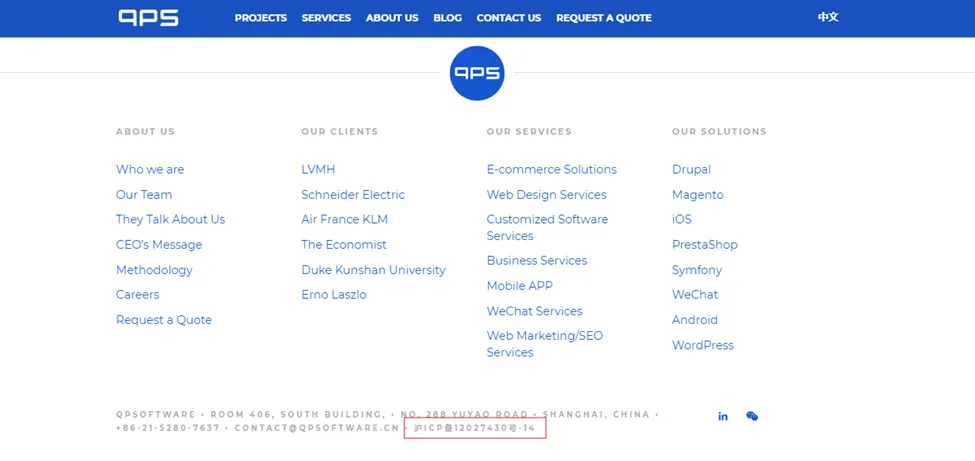
A website on a server in mainland China must have an ICP filing before it goes live, and a foreign company completes it through an entity registered in China. You can register a domain name without one, but no mainland provider will serve your website until the filing is approved. Our guide on how to host a website in China walks through the steps. Once approved, the ICP number is displayed in the footer of your website, as in the example below.
Host your website in Hong Kong or a nearby region
Hosting in Hong Kong or a nearby region is another effective option. It does not require an ICP filing, and you can add a content delivery network (CDN) in the region to shorten the distance your data travels compared with hosting in the United States or Europe. A CDN caches your content on servers close to your visitors, so pages load faster.
Hong Kong is often the strategic choice: it is close to mainland China and offers lower latency than servers further away. For corporate websites, the difference in loading speed between Hong Kong and mainland China is often small, which makes Hong Kong a practical way to speed up a site without an ICP filing.
Use a CDN with points of presence close to China
If hosting in China or Hong Kong is not possible, use a content delivery network with points of presence close to China. There are two common setups:
- Points of presence in Hong Kong: keep your current server and use a CDN with nodes in Hong Kong. This suits businesses without an entity in China.
- Points of presence in mainland China: for the best performance and reach, use a CDN with nodes across the country. This requires an ICP filing, and therefore an entity registered in China.
In both cases, a CDN does not fully replace your main server. For long-term reliability and speed, hosting in China or Hong Kong remains the most effective strategy.

Step 3: Optimize Your Website’s Weight
Beyond blocked resources and hosting, the weight of your pages has a strong effect on loading speed in China.
Videos, images and interactive elements such as JavaScript make pages engaging, but heavy files slow them down. Optimize these elements without losing quality:
- Compress files: minimize the size of your HTML, CSS, JavaScript, images and videos.
- Optimize images and videos: choose the right formats and dimensions to keep quality while reducing file sizes.
- Use browser caching: store some files on visitors’ devices, so they load instantly on the next visit.

Which Hosting Strategy Fits Your Company?
At first glance, hosting in China looks slow and costly to set up, and hosting in Hong Kong faster and cheaper. The right choice depends on your business plan and your long-term strategy for the Chinese market.
For large companies that see China as a key market, hosting in China through a Wholly Foreign-Owned Enterprise (WFOE), with your own ICP filing, data compliance measures and a local presence, is the recommended route. It takes investment and time, but the benefits can outweigh them:
- Trust and reputation: a website hosted in China that displays its ICP filing shows that your business is registered, which matters in some industries. Visitors can also check your company details in Chinese, such as the legal representative and company history.
- Search rankings: Baidu favors fast pages, and our Baidu SEO guide recommends mainland hosting as the best practice to rank on it.
- Chinese online services: an ICP filing lets you run Baidu search ads, and some services, such as a Baidu webmaster account, may ask for a Chinese mobile number, which is easier to get with a local presence.
- Data compliance: the Personal Information Protection Law (PIPL) requires critical information infrastructure operators, and processors handling personal information above the volume set by the national cyberspace department, to store personal information collected in China within China. Other processors may transfer it abroad when they meet one of the conditions of Article 38, such as a security assessment, a certification or a standard contract (Personal Information Protection Law, official English translation). Our PIPL compliance guide explains what applies to your company.

If your long-term goal is to seize the marketing and business opportunities of the Chinese market, establish a Chinese entity and obtain your ICP filing.
If you lack the resources or time for these formalities, hosting in Hong Kong and replacing blocked APIs is a viable alternative. It works well when your main goal is a website that is reachable and fast in China without a large investment.
What Should You Do Next?
Start with the checks above to see whether your site is blocked or only slowed down, then fix the blocked resources before you change hosting. Choose between mainland China and Hong Kong based on your plans for the market.
Entering the Chinese market comes with its own digital challenges, but with the right approach your website can perform reliably. From the Great Firewall to the ICP filing, our ICP license and China hosting consulting team helps you make the right choices, whether that means optimizing your hosting, localizing your technologies or meeting local regulations. Contact us today to discuss how we can help you deliver a smooth online experience to your Chinese audience.
Frequently Asked Questions
Is my website blocked in China?
Test it from inside mainland China, without a VPN, on more than one network. If the page never loads anywhere, the domain or its IP address is probably blocked, which can happen on a shared IP. If it loads partly or slowly, blocked third-party resources such as Google Fonts, Google Maps or YouTube embeds are the usual cause, and you can remove or replace them.
Why is a Chinese website not working?
If you are outside China, a Chinese website can fail for reasons that mirror the ones above: it is hosted in mainland China, far from you, and some Chinese websites limit or slow access from abroad. The distance and the cross-border link work against you in both directions. If you run the website, a CDN with nodes outside mainland China can make it faster for international visitors.
Is WordPress blocked in China?
No, the WordPress software itself is not blocked, and self-hosted WordPress sites can work well in China. Problems come from where the site is hosted and from what it loads: themes and plugins that call Google Fonts, Google Maps or foreign video embeds slow pages down. Host close to China and replace these resources with local or self-hosted ones, as our guide on how to run WordPress in China explains.
Can a CDN fix a website that does not work in China?
A CDN helps when the problem is distance, especially with nodes in Hong Kong or, with an ICP filing, in mainland China. It does not fix a page that waits for blocked resources, and it does not replace a well-placed server. Remove blocked scripts first, then choose the hosting and the CDN that fit your situation.