
How to Submit Your Website or URL to Baidu: The Complete Guide
Updated on |By QPSoftware
To submit your website to Baidu, open a Baidu account, add and verify your site in the Baidu Search Resource Platform (formerly Baidu Webmaster Tools), then submit your URLs with its link submission tool: API push, sitemap or manual submission. Baidu website submission helps Baiduspider find your pages faster, but Baidu does not guarantee indexing.
Key takeaways
- Baidu Webmaster Tools has been called the Baidu Search Resource Platform (ziyuan.baidu.com) since November 2017, and it is only available in Chinese.
- You need a Baidu account, and Baidu asks site owners to complete its real-name authentication before they can use tools such as sitemap submission.
- Verify your site with a file or an HTML tag: CNAME verification has been paused since January 2023.
- Only verified sites can submit links, and a sitemap file lists up to 50,000 URLs of the verified site, in less than 10 MB.
- Submission speeds up discovery but does not replace Baidu SEO: Chinese content, fast hosting and page quality decide what gets indexed.
Why Submit Your Website to Baidu?

If you are targeting the Chinese market, Baidu is a must. It sent 59.26% of search referrals in China in August 2026, while Google, which is blocked in mainland China, had 1.41%, according to StatCounter. If your website is not listed on Baidu, you will be invisible to most potential Chinese customers who search online.
Even if you are not primarily targeting China, or if your site is not translated into Chinese yet, submitting your URL helps Baidu’s crawler find your pages. Baidu then decides what to index based on the quality of each page: our guide to Baiduspider, Baidu’s crawler, explains how it reads a website.
What Is Baidu Webmaster Tools?
Baidu Webmaster Tools is Baidu’s counterpart of Google Search Console. In November 2017, Baidu renamed its webmaster platform the Baidu Search Resource Platform (百度搜索资源平台), available at ziyuan.baidu.com. Once your site is verified, you can use it to:
- submit new URLs and sitemaps with the link submission tool (普通收录);
- see a page as Baiduspider sees it with the crawl diagnosis tool (抓取诊断);
- check your robots.txt file and follow crawl errors;
- follow the number of indexed pages, your search traffic and your keywords.
In September 2026, Baidu also announced an AI traffic analysis report, which will show how often a site’s content is cited, displayed and clicked in the AI answers of Baidu search. It is being opened in stages.
The platform is only available in Chinese. There is no English version of Baidu Webmaster Tools, so plan to work with a Chinese speaker or with your browser’s translation.
What to Know Before You Submit Your Website to Baidu
Here are a few guidelines that give your site a better chance of being indexed by Baidu and of starting to rank. Remember that China strictly controls online content: a website that does not comply with local rules can be blocked.
No sexual content. Pornography is not permitted in any form, and everything considered sexually inappropriate in China must be avoided.
No offensive content. This includes political content, especially when it is controversial or polemical. Illegal content is excluded too, for instance websites about businesses prohibited in China.
Include Chinese content. If your website has a Chinese version, excellent. If not, translate at least one page: you will have a better chance of being indexed.
Host your website in China if you can. In October 2017, Baidu warned that Chinese websites hosted on servers abroad would have display problems in Baidu search. The requirements to host your website in China can be complicated, so it is often better to get ICP license and China hosting consulting to guide you through the process.
Complete the real-name authentication of your Baidu account. Since September 2023, Baidu has disabled sitemap submission and reduced API submission quotas for sites in accounts without real-name authentication, and for low-quality sites. Baidu asks account owners to complete it in the Baidu App, under My, Settings, Account Management, then Identity Authentication.
How to Submit Your Website to Baidu, Step by Step
Opening a Baidu account and submitting a website can only be done in Chinese, as there is no option to change the language.
The account is the main hurdle for foreigners. China’s Cybersecurity Law, in force since June 1, 2017, requires online services to collect the real identity of their users, and Baidu stopped accepting registration with an email address. Today, a Baidu account must be registered with a mainland China mobile number, as the help center of Baidu Tongji states. Many foreigners therefore cannot open an account without local support, or somebody in China who can provide a number.
The steps below follow Baidu’s order: the account first, then the verification of your site, then the submission of your URLs.
Step 1: Register Your Baidu Account
If you do not have a Baidu account, open one on the Baidu account registration page. In 2018, the form worked as follows:
- Choose a username of up to 14 letters or 7 Chinese characters. It cannot be changed afterwards.
- Enter a mobile phone number.
- Set your password.
- Click the button to receive a verification code by SMS, then enter the code.
- Tick the checkbox to accept the user agreement and the privacy policy.
- Click the register button, and your account is ready.
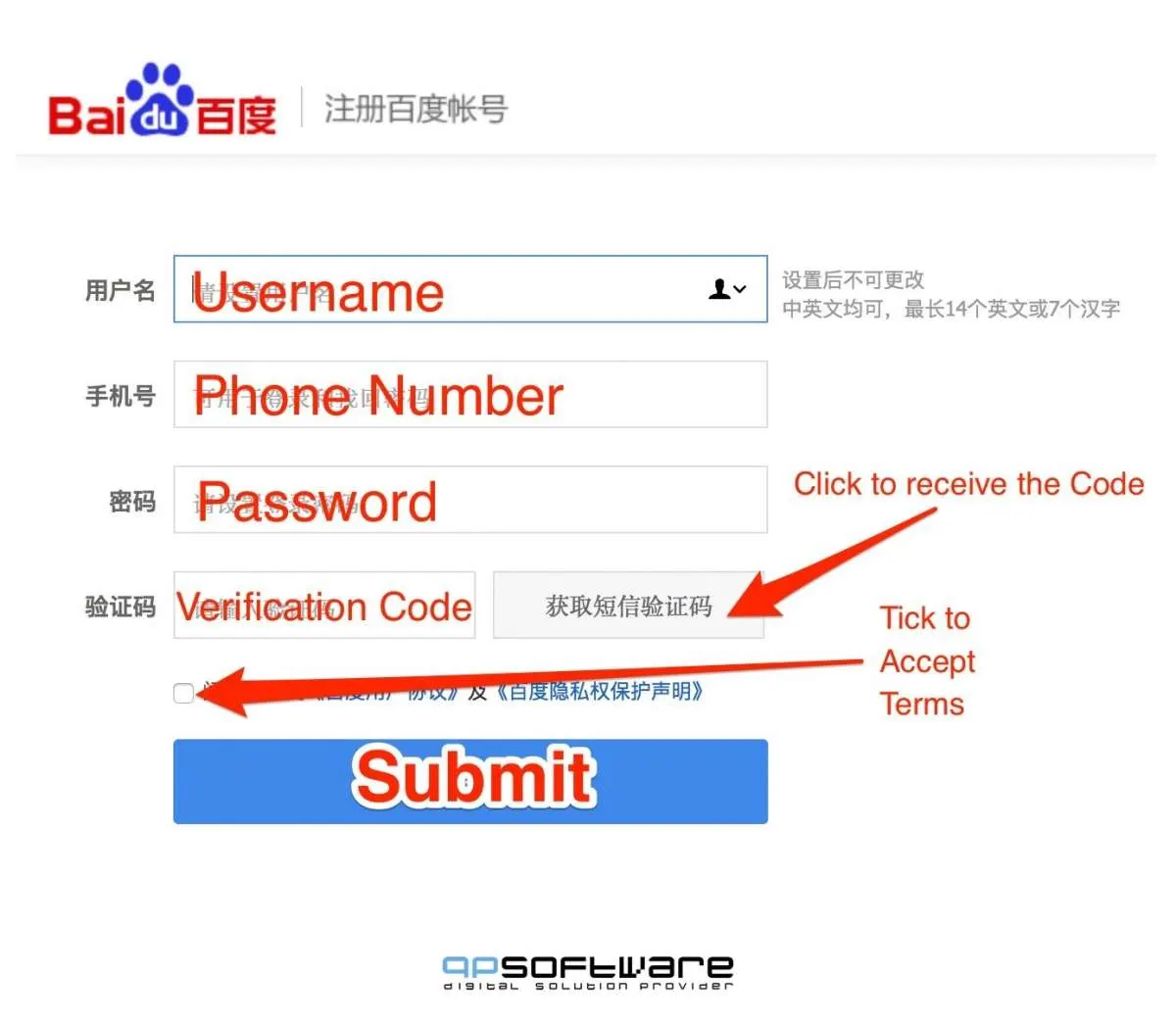
The Baidu account registration form as it looked in 2018: the current form may differ.
Then complete the real-name authentication of the account in the Baidu App, as described above.
Step 2: Add and Verify Your Website
Log in to the Baidu Search Resource Platform, open the user center, then site management, and add your website. Baidu’s illustrated guide to site verification describes the process:
- Enter the address of your website. An HTTPS site must include the protocol (https://).
- Choose one to three fields that describe your site.
- Choose a verification method and follow its instructions.
- Click to complete the verification.
Two verification methods are available:
File verification. Download the verification file and upload it to the root directory of your website. The verification can fail if your homepage redirects (301) or loads slowly.
HTML tag verification. Copy the HTML tag that contains your verification code and paste it between the <head> and </head> tags of your homepage, then save and publish the page.
Earlier versions of this guide described a third method, CNAME verification, which Baidu has paused since January 2023. Once your site is verified, keep the file or the tag in place: removing it cancels the verification. If you use Baidu Analytics (Tongji), your site still has to be verified on the Search Resource Platform.
Step 3: Submit Your Site to Baidu
Once your site is verified, you are ready to submit your website to Baidu with the link submission tool (普通收录). Since March 2021, the tool has only been open to verified sites. It offers three ways to submit:
- API push: your website sends its new URLs to Baidu automatically, within a daily quota.
- Sitemap: you give Baidu the address of your sitemap file (see the next section).
- Manual submission: you paste URLs in the link submission form and click the submit button.
Baidu states on that page that submitted links are processed according to its standards, with no guarantee that they will be indexed.
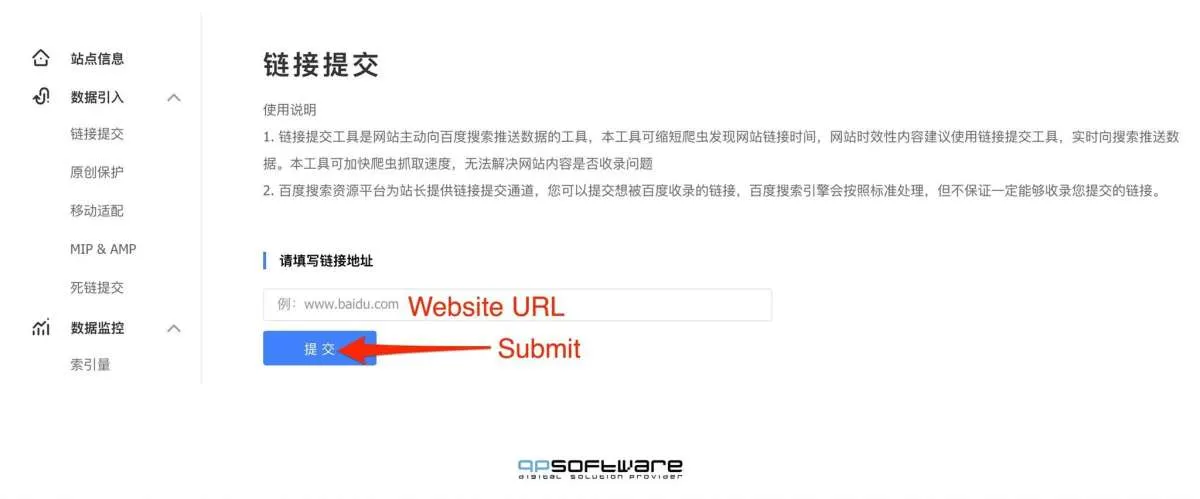
The link submission page as it looked in 2018.
Some sites also get the fast crawl tool (快速抓取), which replaced the fast indexing tool (快速收录) in April 2024. URLs submitted with it are crawled first, within a quota, and Baidu grants it to its VIP partner sites or through platform activities.
How to Submit Your Sitemap to Baidu
To complete the indexing of your website, we highly recommend submitting your latest sitemap to Baidu. Only verified sites can submit a sitemap, so complete the steps above first. Baidu’s sitemap protocol sets the rules:
- Formats: XML, plain text with one URL per line, and sitemap index files for several sitemaps.
- Size: up to 50,000 URLs and less than 10 MB per file. Split a larger list into several files.
- Encoding: UTF-8 or GBK.
- URLs: complete addresses, protocol included.
- Scope: a sitemap submitted for a verified site may only contain URLs of that site.
Place the sitemap in the root folder of your website (for example /sitemap.xml), open the link submission tool of your verified site and submit the address of the sitemap. Baidu says it usually processes a submitted sitemap within an hour, but it does not promise to index every URL it contains.
Sitemap submission used to be by invitation only. In 2018, Baidu Webmaster Tools listed its invitation criteria, such as original content, a good user experience and quality pages that were not indexed yet.
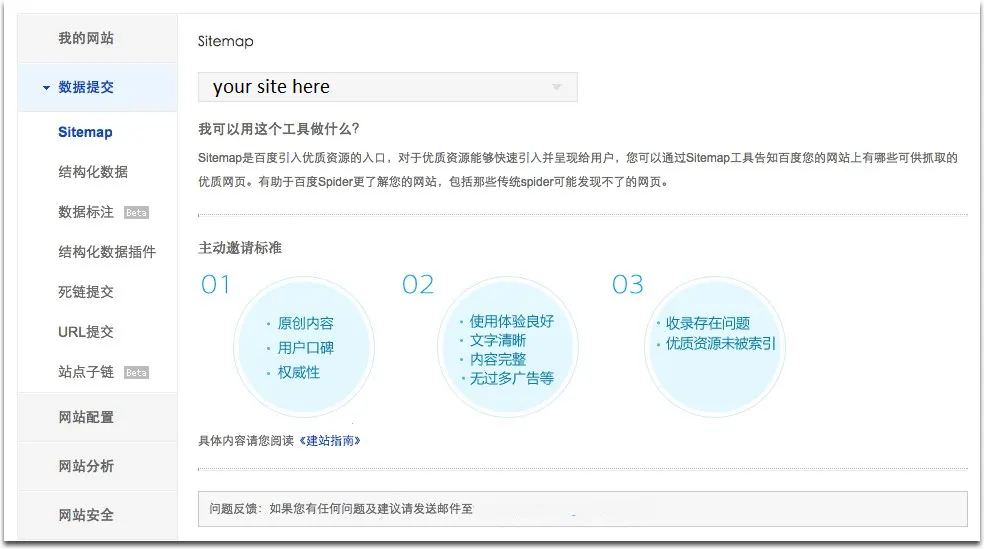
Today, the conditions concern the account and the quality of the site: since September 2023, sitemap submission has been disabled for accounts without real-name authentication and for low-quality sites. Sitemaps remain a good tool to help Baidu understand the structure of your website.
Is Submitting Your URL to Baidu Enough?
Signing up to Baidu Webmaster Tools and submitting your website is just the first step. As with Google, traffic will not appear just because you submitted your URL: you must implement an SEO strategy for Baidu.
The SEO techniques that work on Baidu are similar to the ones you use for Google, with some significant differences. This guide explains how to do SEO in China. Do not confuse site verification with Baidu certifications, the services that display trust information about a business in Baidu search results.
A good SEO campaign in China also requires more than technical knowledge: you need to know the local culture well and master the Chinese language. That is why working with a Baidu SEO agency based in China often brings better results, and faster.
What Should You Do Next?
Registering a URL on Baidu is not difficult in itself, but a few roadblocks make it a real challenge for foreigners: the Chinese-only interface, the account and its real-name authentication, and the rules on content and hosting.
Start with the account and the verification of your site, then submit your sitemap and follow the indexing of your pages in the platform. Once your pages are indexed, the work moves to ranking them.

QPSoftware is a web agency in Shanghai that can support you during the process. Our Baidu SEO services cover the configuration of Baidu Webmaster Tools, the indexing of your website and its ranking. Contact us today and we will assist you in registering your website with Baidu.
Frequently Asked Questions
Is there an English version of Baidu Webmaster Tools?
No. Baidu Webmaster Tools, now called the Baidu Search Resource Platform (ziyuan.baidu.com), is only available in Chinese, and so are its guides, apart from an English FAQ about Baiduspider in Baidu’s help center. Browser translation helps with the menus, but the account, verification and submission steps are easier with a Chinese speaker.
How do I get the Baidu verification code for my website?
Log in to the Baidu Search Resource Platform, open site management and add your website. Choose HTML tag verification: Baidu gives you a tag that contains the verification code of your site. Paste it in the head section of your homepage, publish the page, then click to complete the verification. You can also verify your site by uploading a file.
How long does Baidu take to index a submitted website?
There is no fixed delay. Baidu says it usually processes a submitted sitemap within an hour, but submission only helps Baiduspider discover your pages: Baidu does not guarantee that submitted links will be indexed. Indexing then depends on the quality of your pages, their Chinese content and how fast your website loads in China.
What is the difference between Baidu site verification and Baidu certification?
Site verification proves to Baidu that you own a website, which gives you access to the tools of the Baidu Search Resource Platform. Baidu certifications are separate services, such as Baidu Guarantee or the official website certification, that display trust information about a business in Baidu search results. Most of them are paid and require business documents.